
A construction company website should connect completed projects to the work a prospective client needs. Grouping projects by type of work is often a useful starting point: refurbishment, façades, building services or finishing work. Each project should also state the building type and the exact scope your company delivered. A visitor can then find a comparable job and decide whether to discuss their requirements with you.
Before design begins, select a few projects with complete descriptions and materials cleared for publication. During a website development discussion, these examples help us agree the service structure, project listing and enquiry form content.
Should projects be grouped by work or building type?
Start with the way clients describe the job. If your company contracts waterproofing, façade work and refurbishment, these can be the main routes into the project listing. Someone looking for a flat-roof repair should be able to find relevant work without understanding your internal departments.
Building type can be a secondary label: residential, commercial, industrial or public. If you undertake complete construction within one particular building sector, that sector may provide a more useful first view. Match the number of groups to the projects you actually have. A few projects need a straightforward listing with clear names; complex filters and empty groups make the search longer.
Prepare one main page for each project and link to it from every relevant listing. You can then update its description or status in one place. If the CMS already produces several almost identical URLs, review redirects and canonical annotations. Google explains how to indicate a preferred version of duplicate pages. A category does not, by itself, require another copy of the same project description.
What should a project record contain?
Prepare the record while the person who managed the work can still provide the details. A building name and photograph establish the setting. The description should explain why the job is relevant to a future client.
Scroll the table sideways to see all columns.
| Item | What to establish |
|---|---|
| Building and work type | The kind of building involved and the service the project belongs to. |
| Company role | Main contractor, subcontractor or contractor for a particular phase, according to the actual engagement. |
| Scope | The work your company undertook and the part of the building the description covers. |
| Status and period | Whether the stated work is complete or ongoing, and when that information was checked. |
| Publication materials | Who approved the client name, project information and selected photographs. |
If you state an area, explain whether it covers the whole building or the part you worked on. Apply the same care to timing: the duration of one phase does not describe the entire construction programme. Leave an unconfirmed figure out until the responsible person has checked it.
How should you describe work delivered as a subcontractor?
State your role beside the work description, early enough for a visitor to read it before the gallery. For example, “floor installation in a commercial unit” defines the scope. “Construction of a commercial building” could give the wrong impression if your involvement covered only the finishing stage.
Explain conditions relevant to a similar job when they are accurate and cleared for publication. Working in occupied premises or coordinating with other contractors may be useful context. There is no need to publish internal agreements, another company's prices or details the client has not approved.
What might a refurbishment project listing look like?
Imagine a company with two projects: an office refurbishment and replacement flooring in a shop. This is a fictional content example. The office work covered partitions and finishing; the shop engagement covered flooring only.
Both projects can appear in the refurbishment listing. The shop can also appear under flooring, linking to the same project page. That page states the actual scope and links to the relevant service. A prospective client can then enquire about similar work.
Write the short description in an ordinary document first. Once the company's role is clear without photographs, choose a cover image and details that help explain the work.
What does the Eurex website in our portfolio illustrate?
Our website portfolio includes Eurex, a company working with steel structures. Its website separates services from the gallery, with individual areas such as erection and design. This is a concrete example of a service structure giving context to the visual presentation of work.
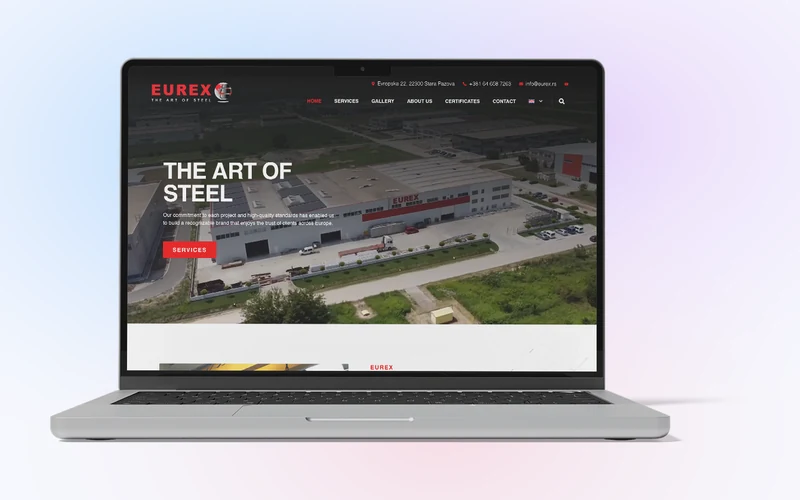
For a construction company whose projects are a main part of its offer, we also recommend linking each service to relevant project records. Someone reading about façade work can then find buildings where the company delivered that work.
How should you prepare photographs and their descriptions?
Choose photographs that show the work: an overall view when the space matters, or a detail when it explains the execution. For before-and-after views, identify the same location or part of the building so the comparison does not suggest work that was not done. Keep the photographer's details and publication approval in the project record.
A caption should explain what a visitor cannot reliably establish from the image alone. Alt text briefly describes the image within the page's context. Google's image guidance recommends descriptive alt text and relevant surrounding content, while avoiding keyword stuffing. Repeating “construction company Belgrade” beside every photograph does not explain what it shows.
If approved photographs are unavailable, hold the gallery or publish a verified written description. Do not present another building's photograph as your own work. For ongoing additions, agree how CMS content editing will work and who checks changes before publication.
How can you check whether projects lead to relevant enquiries?
Ask someone who did not prepare the content to find a project for a specific job, such as an office refurbishment. Observe where they start, whether they understand your role and which information they still need. Revise names and descriptions where they hinder the task.
A form beside a project can carry its name as enquiry context, with an option for the visitor to change it. For an initial enquiry, ask for the work type, location, approximate scope and contact details. Exchange detailed documentation once you agree how it should be sent.
Include the planned project groups and the people supplying information in your website project brief. For a construction company website estimate, send a service outline and a few approved project records. We can use them to propose the content structure and identify what is missing before design begins.