
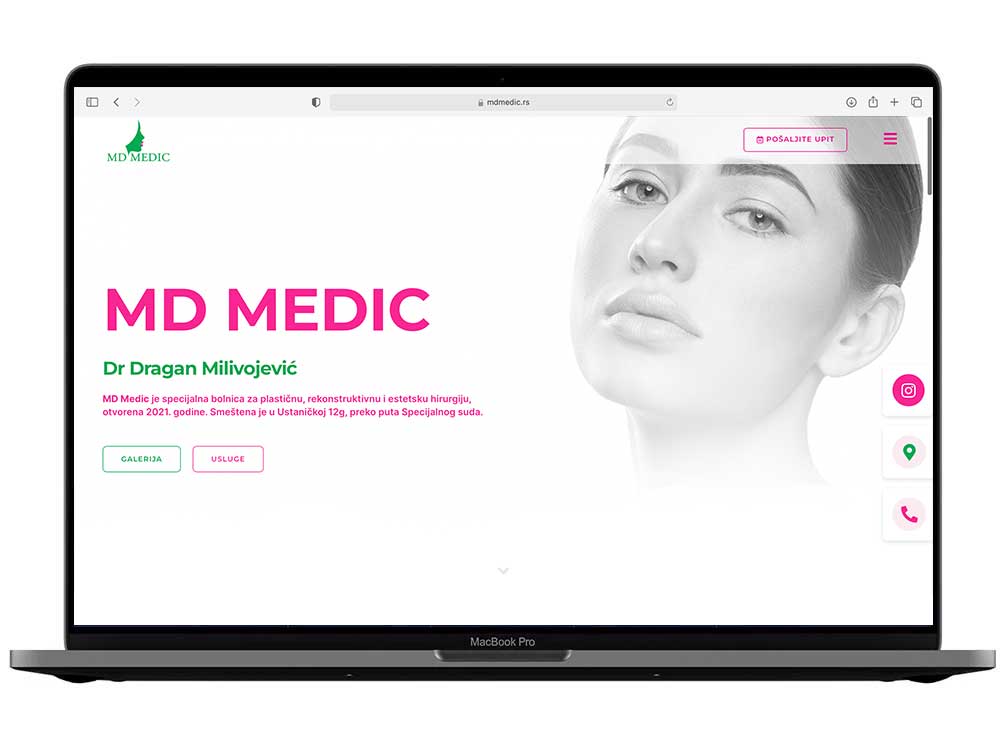
How can one website bring together several areas of practice, introduce a doctor and make contact straightforward? MD Medic is an example from our portfolio that shows how the structure of a business website can help visitors find the right information before sending an enquiry.
In this project overview, we look at the content layout and the journey from the home page to contact, with guidance you can apply when preparing your own website.
MD Medic – project at a glance
- Client: MD Medic, a specialist medical practice in Belgrade.
- Project type: a business website with an overview of services.
- Areas of work from our portfolio: web design, organisation of the service presentation and SEO setup.
- Key elements: information about the practice and doctor, service categories, a gallery, address, phone number and contact form.
Visit the MD Medic website or other projects in our portfolio.
The challenge: a clear offering across several areas of practice
When a website presents many services, a long list in a single block of text makes navigation difficult. Visitors who already know the name of a service want a quick route to the details. Someone exploring the offering for the first time looks for a broader category, information about the specialist and a way to ask a question.
The service overview plays a central role in this project. The home page connects the introduction to the practice with groups of services and contact information. This organisation separates getting to know the practice from reading in detail about an individual service.
1. A home page that explains whose website it is
The name of the practice and the doctor appear at the beginning of the page. Visitors immediately receive context, while the section about the practice provides more information. Photography and the visual identity bring these parts together.
For a business website, this is an important decision: the first screen should help visitors understand the offering and choose their next step. A detailed biography and explanations can have their place further down or on a separate page.
2. Services organised by area
The overview on the MD Medic website groups services by area of practice, with links to individual content. Visitors can therefore start with a general category and continue to the topic that interests them.
We use the same principle when planning business websites with more complex offerings: first we establish the main groups, then the content of each page and the links between them. Each page should have a clear purpose so that the same introductory text is not repeated throughout the website.
3. Contact available alongside the content
The phone number, address and option to send an enquiry are part of the website. Visitors can choose the communication method that suits them after first learning about the offering and the practice.
When planning a similar project, it is worth defining the contact form and appointment booking system separately. Sending an enquiry begins a conversation; automatically selecting and confirming a time slot requires additional functionality and an agreement on how it will work.
Checking the enquiry journey on a phone
For a similar website, organise testing around a task: open the home page on a phone, find a service and then find contact information. Check text readability, menu opening, button touch areas and the message shown after a successful form submission. Pay particular attention to how the form behaves when a required field is empty. This kind of testing helps reveal obstacles that are not visible in a static design proposal. After launch, track phone clicks and successfully sent messages separately, because they represent different visitor actions.
What does this example demonstrate for your project?
A good content layout begins with visitors’ questions. Before choosing colours and effects, it helps to write down what a person needs to learn, in what order and how they will contact you. This becomes the basis for the menu, main pages and calls to action.
- List your services and group those that belong to the same area.
- Prepare information about your team and materials you have permission to publish.
- Choose the main contact step: a phone call, an enquiry or a separately agreed booking system.
- Agree on content maintenance: who updates contact details, the offering description and photographs.
If you are planning a similar project, explore what our website development includes. Our website project brief guide will help you prepare your materials.
Do you have a different scope or more complex functionality? In your project estimate request state the number of services, the languages needed and how you want to receive enquiries. On that basis, we can suggest a structure and scope of work.