
Short answer
A clinic website should help visitors find a service, learn about the team, check the location and understand how to get in touch. Before development, prepare approved copy, photographs, clinic details and a clear process for responding to inquiries. Decide whether the website will accept appointment requests or allow visitors to select and confirm an available time.
Start planning with a practical task: someone opens the website on a phone, finds a service and wants to ask about an appointment. Write down the information they need along the way, then use it to organise the pages and contact options.
What information should you prepare before design starts?
Create a working document with the clinic's correct name, address, opening hours, telephone number and inquiry email address. If there are several locations, identify which services and contact details belong to each. Assign someone to check these details before publication.
Prepare service names, short explanations and the questions people regularly ask the clinic. An appropriate person at the clinic should prepare and approve professional descriptions and any instructions. The web team can help make the copy clear and easy to read, while the clinic reviews its professional accuracy.
Prepare introductions to the clinicians and team, together with photographs you have permission to publish. Note what each file shows and which page it belongs to. An image description should match the actual photograph, such as “Entrance to the MD Medic clinic”, only if that is the entrance shown. Avoid repeating the same description for every image.
How should you organise services and team information?
The homepage can introduce the clinic, its main areas of work and links to further information. A service page should explain the service and make it clear how to ask the clinic a question about it. Where there are several areas of work, group them according to the clinic's actual offering.
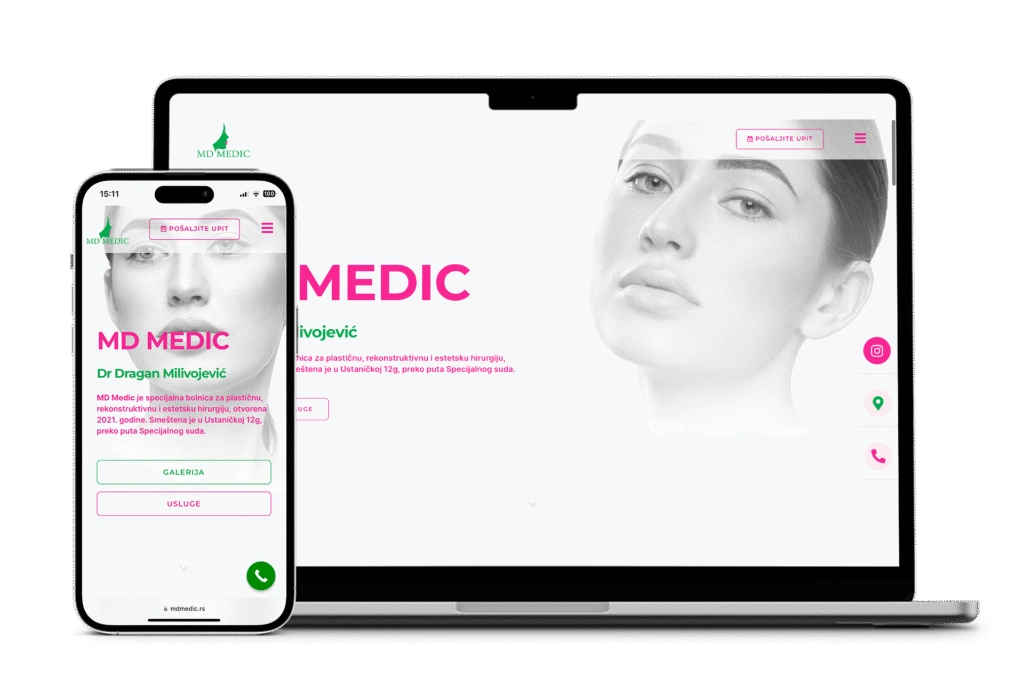
The MD Medic project in our portfolio presents service categories, information about the clinic and physician, a gallery, an address, a telephone number and an inquiry form. Visitors can read about a service, learn about the clinic and then send an inquiry.
Before design starts, make a simple page list. For each page, record:
- The main question the page answers.
- The copy and photographs available, and any material still missing.
- The person responsible for approving the content.
- The visitor's next step: another service, information about a clinician or contact.
This gives each piece of content a clear place. A long explanation of every service does not need to appear on the homepage, team page and contact page alike.
Do you need an inquiry form or an appointment-booking system?
An inquiry form can receive a message and a request for an appointment. If a staff member still needs to check availability and contact the person, the message after submission should clearly say that the request has been received. Do not describe the appointment as booked until the agreed process has confirmed it.
An appointment-booking system requires further decisions: where available times come from, whose schedule is used, who confirms a booking and how changes or cancellations are handled. If the team already uses another system, its integration options and scope need checking before an estimate is prepared. Displaying a calendar does not define the complete process.
For a straightforward initial inquiry, agree which contact fields are needed, where the message goes and who handles it. You can prepare and test this form with sample data; medical documents are not needed to check the layout and delivery of a contact inquiry. If document submission is required, define that process separately.
How should you present the location, opening hours and contact details?
Alongside the address, include useful information the clinic can confirm, such as the entrance, floor or a nearby landmark. If you display a map, check that the marker identifies the correct clinic, especially when several businesses share an address. Open the directions link on a phone as well.
The telephone link should call the correct number, and the email link should use the right address. Keep opening hours consistent across the contact page, footer and other places where they appear. If a particular team handles calls or messages, explain the next step visitors can expect.
A map supports the written address. Visitors should still be able to find the essential details without opening it. On a long service page, provide a clear route to contact without requiring readers to find their way back to the homepage.
What should you check before publishing a clinic website?
Review the agreed functions on a phone and computer. The following table proposes acceptance criteria for a new project.
Scroll the table sideways to see all columns.
| Task | Expected result | Who confirms it |
|---|---|---|
| Find a particular service | The menu and service overview lead to the correct content; the heading and contact step are clear. | Clinic representative and web team |
| Check team information | Names, roles, approved descriptions and photographs refer to the correct people. | The clinic's content owner |
| Call and open directions | The links on a phone open the correct number and location. | Clinic representative |
| Send a test inquiry | The test message reaches the agreed destination, and the visitor sees confirmation of receipt. | The inquiry recipient and web team |
| Leave a required field empty | The form identifies the field that needs attention and allows a correction without losing the rest of the entry. | Web team |
| Read the submission confirmation | The wording distinguishes a received request from a confirmed appointment and explains the actual next step. | The person responsible for handling inquiries |
Use clearly labelled test messages and contact details intended for the check. Seeing a success message and confirming that the email actually arrived are separate checks. If booking is part of the agreed scope, add scenarios for an available appointment, a change, a cancellation and simultaneous selection of the same time.
Who maintains the content, and what should you send for an estimate?
Agree who reports a change to the telephone number, opening hours, services or team, who approves it and who publishes it. During handover, have the responsible person follow the agreed editing process. Clarify the scope of technical support and content changes in your website maintenance agreement.
With your estimate request, send a page and service list, required languages, available copy and photographs, contact details and a description of what happens after an inquiry. State whether you need a form or a connection to an appointment schedule, and identify anything still to be checked. Our website brief guide can serve as a working template.
With those materials, we can propose a website development scope and specific checks before launch. In your estimate request, include project information and open questions; patient records are not needed for the initial discussion.