
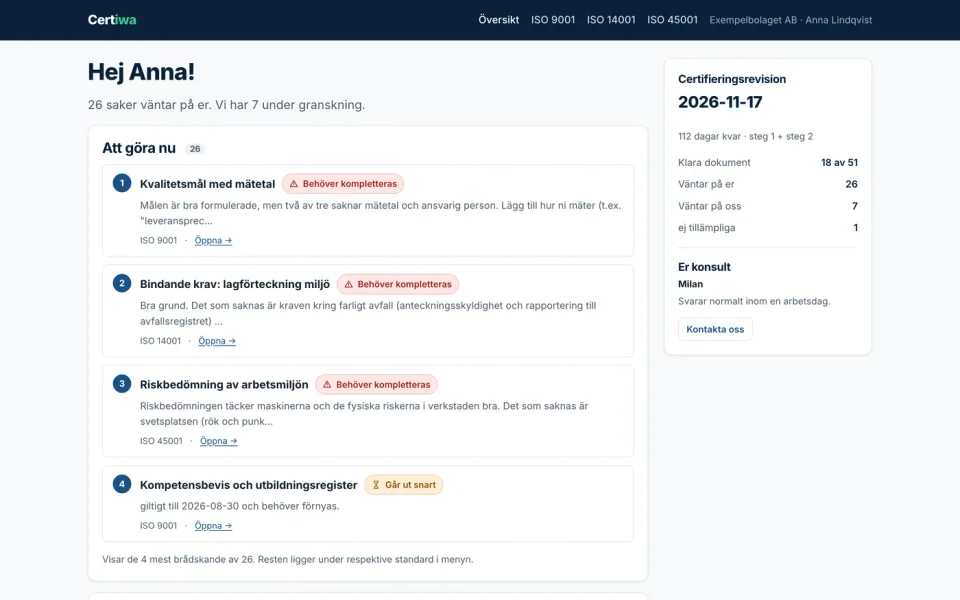
Clients can see what is expected next
Preparing documentation for ISO certification involves requirements at different stages. Some documents still need to be submitted, others await review, and some require revisions. We organised the portal around these tasks so that each status has a clear meaning and points to the next step.
The overview separates client tasks, documents under review and completed items. Individual standards have their own views. A requirement page explains the document and presents information relevant to its status. The demonstration also shows preparation for a scheduled audit.
Document status guides the collaboration
Statuses distinguish documents that have not been submitted, items under review, revision requests and approved documentation. Items approaching expiry or considered not applicable are marked separately. A revision comment explains what the client should address in the next submission.
The public demo’s consultant view presents several fictional clients and a queue of documents awaiting review. The same process can therefore be explored from both perspectives: clients follow their tasks, while consultants see the work awaiting their attention.
From a revision request to a new submission
The design decision was to make each document status also identify whose turn it is to act. Clients do not need to open every item to find their next task: the overview separates their responsibilities from documents being reviewed by the consultant. Revisions, renewals and first submissions remain distinct actions.
- The client opens an outstanding item. In the demonstration overview, a revision request shows its reason and a comment, such as a missing document version or date.
- The detail explains the next submission. The document description, relevant standard, status and available history appear together. The action label changes depending on whether the file is being submitted for the first time, revised or renewed.
- The document moves into review. In the separate sign-in area, a permitted new submission receives the “under review” status and the next version number. The earlier comment is removed from the current submission because it referred to the previous file.
- The consultant sees the review queue. The consultant demo brings together documents awaiting review, with their client and standard. An approved item and a revision request have different next steps.
The public demo presents these screens using fictional data. Its submission and processing buttons display a demonstration notice; they do not upload actual documents or change client records.
Separate access for document submission
Alongside the demonstration interface, we developed a sign-in area. An assigned account receives a view of its requirements and can submit the corresponding document. A new submission changes its status to “under review”. Approved and non-applicable items cannot have their documents replaced through this workflow.
Submission checks the permitted file type and size, and document access is connected with the user account. Account creation and consultant processing are organised separately. The public demo is not an open administration area for actual clients or a place to submit business documents.
What does the document submission area check?
The rules apply to a specific requirement and signed-in account. Hiding a button is not enough: the server checks that the requirement belongs to the client and that its status permits a new submission.
- Access to the requirement: upload and download operations look for the document in the signed-in client’s records; unknown requirements are rejected.
- Status before upload: submissions for approved or non-applicable items are rejected, rather than allowing a new file to replace a completed item through the same form.
- The file itself: size, permitted extension and content type are checked. Only an accepted submission updates the document, status and version.
These are workflow checks, not a claim that the portal or its users are ISO certified. Approval of a document in the portal does not replace a certification body’s decision.
B2B collaboration can start with documents
This project presents a B2B portal built around requirements and documentation. A store and shopping basket are unnecessary when the business process involves submission, review and revisions. The interface follows Certiwa’s visual identity, with Swedish labels and guidance.
The companies, people and statuses shown in the demo are fictional. For a similar web application, we first define the roles, required information and responsibility for status changes. Access scope, support and document handling procedures are then agreed around that workflow.