Connecting field work with customer approval
Livsmedelsstädarna provides cleaning and hygiene services for food production and other demanding environments. Recording that a facility has been cleaned is only one part of the work. Teams also need to know which points were inspected, where an issue was found, who is correcting it and whether the result was checked again.
The solution includes internal inspections and a customer portal. In the internal workflow, a factory consists of departments, machines and control points, with one inspection connecting their sequence, findings and final submission. The customer portal is a separate area for reviewing records and collaboration. A new inspection starts a fresh check while keeping the previous history accessible.
A clear next action for each role
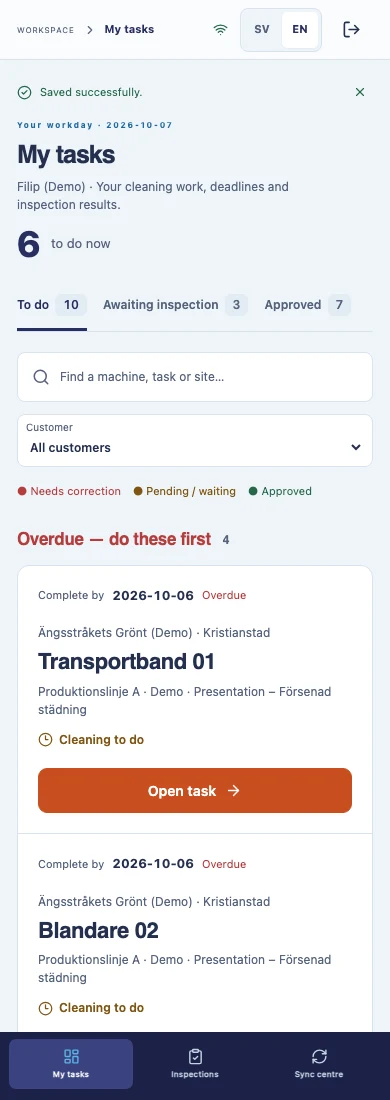
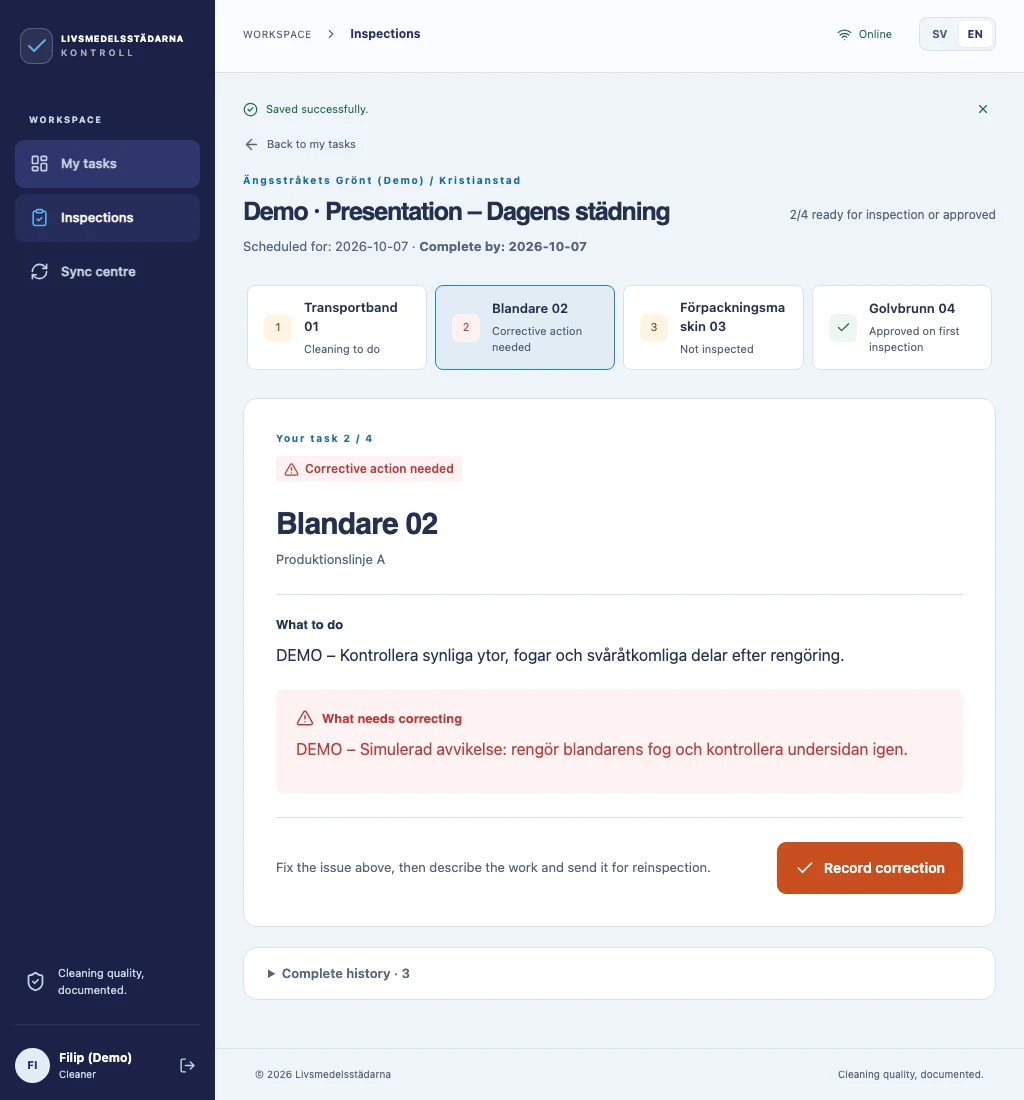
In the internal workflow, the shift lead starts an inspection and follows machines in production order. The screen presents the instructions, current finding and next action. A failed check is linked to a photograph and a responsible cleaner; an additional comment is optional. After cleaning is repeated, the shift lead reinspects the same point.
Cleaners use their internal panel to report faults with a comment and photographs; a fault report does not approve an inspection. Administrators maintain the site structure and access permissions, and review completed reports separately from work in progress. Assigning responsibility for a finding does not grant additional access rights.
- The shift lead handles the internal inspection, reinspection and final submission.
- Cleaners report faults, while administrators manage access and review completed reports.
- The customer portal provides a separate view of permitted records and a collaboration workflow.
One inspection: from a finding to the final report
The design decision was to keep a whole-factory inspection from becoming a collection of disconnected reports. The shift lead selects the factory once, follows shared progress and resumes an open inspection instead of creating a duplicate by clicking again.
- Start: the inspection covers departments and active machines in production order, with the shift lead’s access checked.
- Finding: a clean point passes; a failed check records a photograph and the responsible person. The original issue stays in the history.
- Reinspection: after cleaning, the same inspector checks the point again. The new result does not erase the previous finding or its evidence.
- Submission: all points must pass and local work must be synchronised. One submission completes the internal factory inspection and connects its report with that revision.
Findings, history and approval in a customer portal
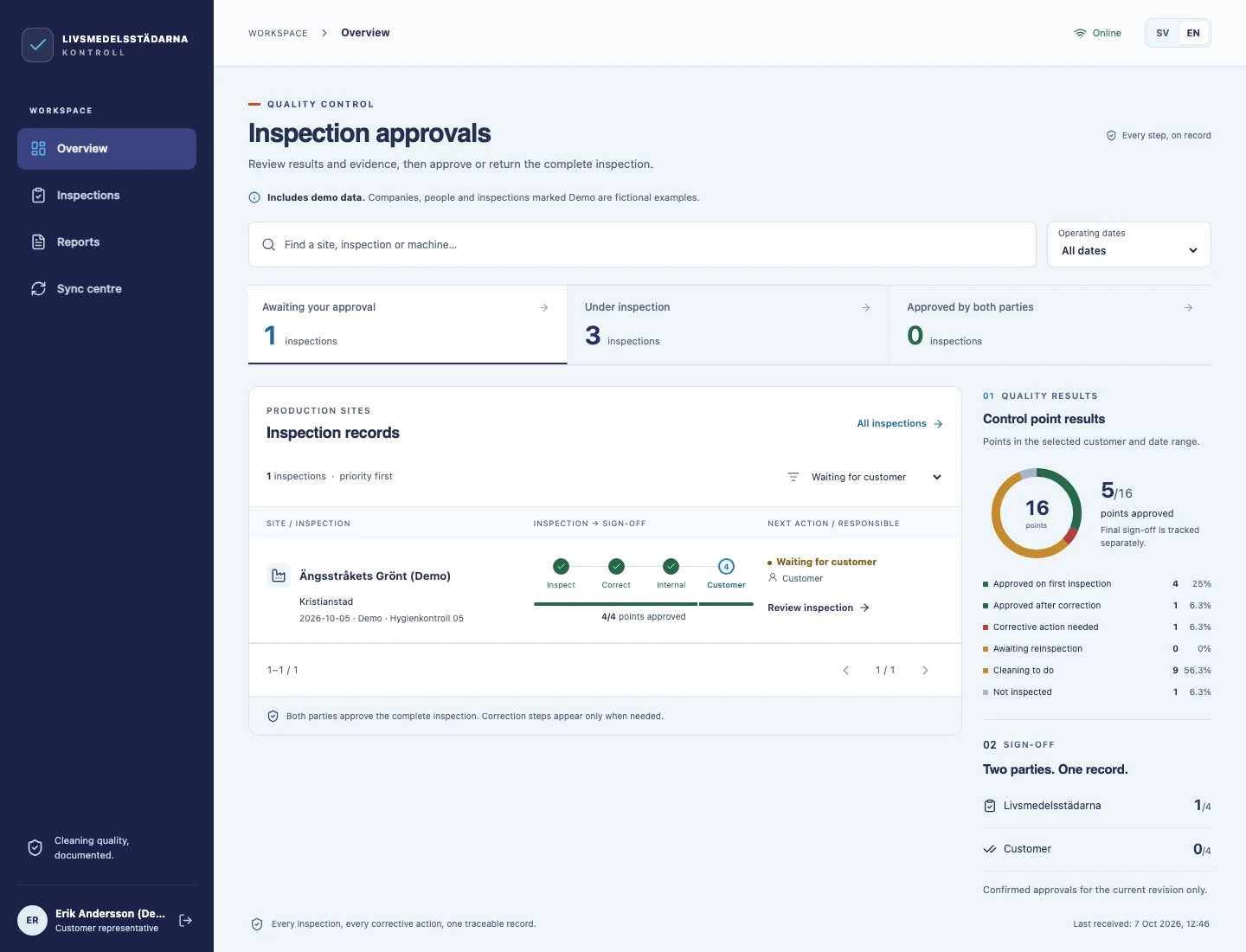
The customer portal lets a customer representative review the complete inspection: results, the history of findings and corrections, report downloads, and approval or return with a comment. This customer collaboration workflow is separate from the shift lead’s internal report submission. Reviews and feedback refer to a specific record revision.
Earlier records remain available after further checks. This separates the current status from the work history: the original issue and its resolution remain visible. This type of B2B customer portal supports shared service records and document approval.
Phone and tablet access with offline support
The interface adapts to phones, tablets and computers. Field users see the task, its instructions and the action they need to take. Larger screens provide a broader view of production sites and results. The internal interface and PDF/Excel reports support Swedish, English and Serbian.
The shift lead starts the inspection and downloads the workspace while connected. An inspection already downloaded can continue offline: new findings and photographs are saved locally and sent when the connection returns. The interface distinguishes local entries from synchronised work. Starting a new inspection, final submission and report generation require an internet connection.
For a similar field workflow, read how to choose between a PWA and a native app, including device support, offline work and synchronisation.
Submission and reports follow the same inspection
Administration covers customers, sites, control points, accounts and access. Once all internal inspection points have passed and local entries are synchronised, the shift lead submits one report for the factory. PDF and Excel group results by department, with responsible people and the history of findings. Access permissions determine which records each user can see.
Our work covers interface design and web application development for this business process. The project demonstrates how custom software can support specific roles, field tasks and customer collaboration. The screens shown here contain clearly labelled demonstration data.
How do we check the internal inspection workflow?
Automated scenarios for the internal application cover the sequence of actions, not just opening a screen: starting an inspection, recording a failed check offline, synchronising, reinspecting and exporting the completed report.
- Retries: sending the same request again should not create another inspection or duplicate a finding.
- Access: permission for one department is insufficient to submit a whole-factory inspection; changes in permissions are checked too.
- History: reopening an inspection and adding a later entry must not alter a previously saved report revision.
- Exports: the PDF and Excel must refer to the same submission and saved results, grouped by department.
These checks apply to the internal workflow. The customer portal screens illustrate the separate collaboration area. Screens on this page use demonstration data; they do not represent measured business outcomes.