
App Store and Google Play publishing should start with accounts your company controls and a named release approver. Your company confirms its business details and product information. The development team prepares the app and its submission within the permissions it receives. Before development ends, decide who monitors store messages and who verifies that the public version is available to users.
A test installation on a phone establishes only part of readiness. Public distribution also needs account preparation, a store listing and access for reviewers. Ask for these responsibilities to be itemised in your mobile app development proposal. This guide covers public distribution; an app intended only for employees needs a separate distribution decision.
Whose name should the store accounts use?
For a legal entity's app, plan organisation accounts managed by a responsible company representative. During organisation enrolment, Apple verifies legal identity and authority, and lists the legal entity as the seller. Individual enrolment uses a person's legal name. Apple also lists a D-U-N-S number, a work email on the company's domain and a functioning website among organisation requirements. Check the applicable conditions and exceptions when enrolling.
Google distinguishes personal and organisation accounts and directs business use to the latter. A D-U-N-S number is also part of organisation verification, with a separate process for government organisations without one. Start identity checks during development so unresolved business details do not hold up an otherwise ready release.
Your company should know who controls owner access and account recovery. Assign someone to monitor the work email and arrange cover during absences. Keep sensitive access details in your agreed access-management system, separate from ordinary project documents.
How does an agency get access without taking over the account?
Invite collaborators through roles, using their own sign-ins. Apple assigns access by role. Only one person can be the Account Holder, responsible for signing legal agreements and renewing membership. Make that responsibility explicit within the company and known to its management.
Google Play Console permissions can cover the account or selected apps. Grant the access needed for the agreed work and record who manages it. Development, listing preparation and release publication may require different permissions.
When changing teams, first confirm that the incoming collaborator can do the required work. Then revoke access the previous team no longer needs. Handover should include contracted supporting services, such as servers and notifications: access to a store does not cover the whole app.
What should the company and developers prepare?
The company confirms the app's name, purpose and support contact. Developers prepare the build and an inventory of actual data flows. Screenshots should show the version submitted for review, using permitted data and functions users will receive.
Scroll the table sideways to see all columns.
| Item | Who confirms it |
|---|---|
| Account identity and authority | The responsible company representative. |
| App description and support | The company's product owner. |
| Build and technical settings | The development team, with an agreed review. |
| Data processing and external services | The company and developers, based on actual app behaviour. |
| Approval to release to users | The named release approver. |
Apple requires app privacy information and a privacy policy URL. Answers must also cover partners whose code you integrate. Google's Data safety form likewise covers data collected or handled by external libraries and SDKs. An app without a phone-number field, for example, may still send data through an analytics service.
Prepare access that lets reviewers use the functions without exposing real client records. Apple's submission guidelines require access to account-based features and available backend services. Explain the demo account and any special steps in the review notes. Check them from the beginning, as someone who has never used the app.
What happens between submission and store availability?
The App Store Connect workflow includes creating the app record, uploading a build and selecting a version for App Review. Assigned roles determine collaborator access. Google distinguishes app and update statuses, including testing, review and availability to users in selected countries.
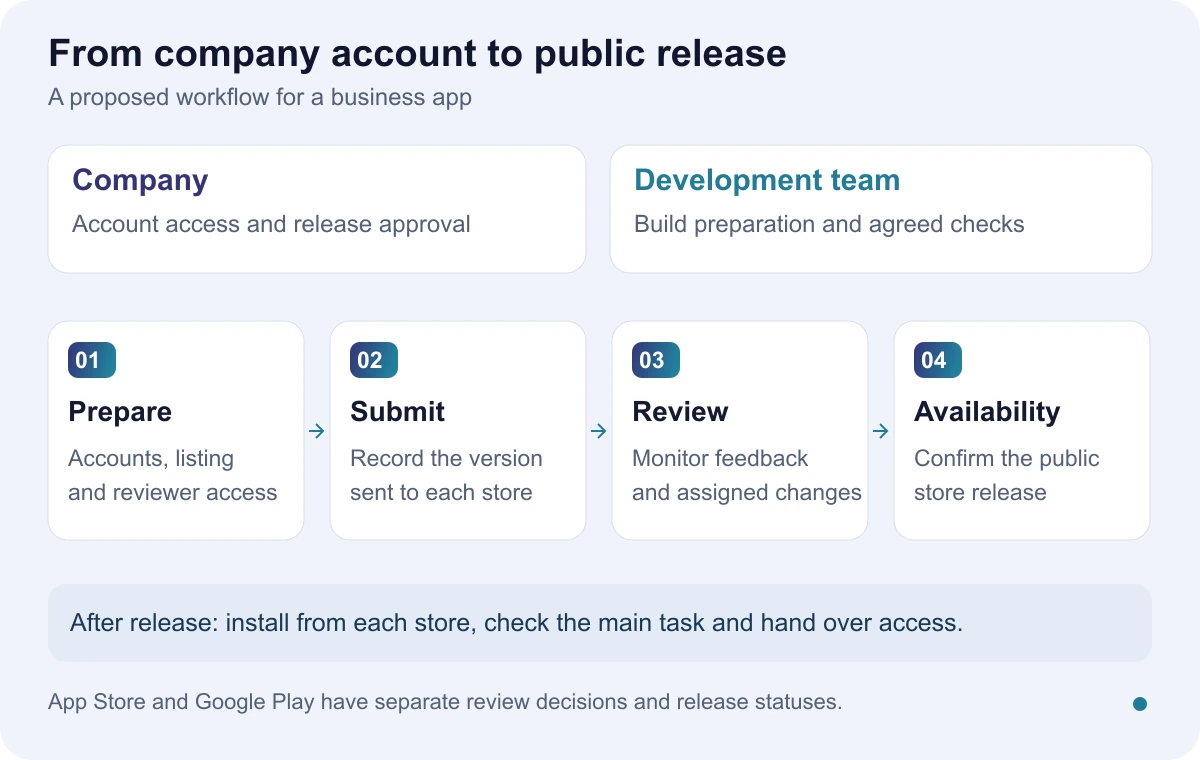
Record separate dates for technical readiness, submission and confirmed public availability in each store. Whoever runs the launch campaign needs to know which status is verified. Apple and Google control review decisions, so the agreed development completion date does not establish an approval date.
When a store requests changes, record the affected version and the person responding. A correction may require a new build or a listing update. Before resubmitting, check current requirements for the app's purpose and markets, particularly where payments or sensitive functions are involved.
How would a booking app be prepared?
Consider a company publishing a service-booking app. This is a fictional example, not a report of a client-project test. The company manages accounts and support. Developers prepare the build, and an employee confirms that the description and screenshots match the services available at launch.
Before submission, we suggest checking sign-in, booking and cancellation. For each action, examine the user-facing result and the employee's view in the business system. Include a failed attempt, such as a slot becoming unavailable, and define the expected response.
Record the version, device, date and result. If review feedback requests access details, the coordinator confirms that the demo account still works and assigns the response. This exercise does not guarantee store acceptance; it gives the company a verifiable preparation record.
What should be checked after public release?
Install the public release from each store on the agreed devices. Repeat the main task and check support. In the example, the booking confirmation should reach both the user and the correct business account. Record where the installation came from and which version you checked.
Add store-message monitoring and administrative obligations to the maintenance calendar. If the person responsible for an account leaves, complete the handover before their work email is disabled. When services change, check that the public privacy information still describes the app.
What should the company receive at handover?
Ask for an account and role inventory, source code as agreed in the contract, the process for preparing another release and a maintenance agreement. The incoming maintainer should demonstrate access to the required settings. Record outstanding work with a responsible person and a next step.
Our guide to shared or separate Android and iOS development examines the codebase decision. For a mobile app estimate, describe the intended users, their main task and any store accounts your company already has. The initial discussion needs no passwords or real user records.