
A B2B portal displays different prices and product ranges according to the company and location a signed-in user is purchasing for. Define the valid price list, available products and permitted actions for each business account. Recheck those terms when a buyer changes location or submits an order, even if the basket was prepared earlier.
Start with a few commercial agreements you already use. If a sales representative decides an exception today, record who approves it and how long it lasts. Our B2B portal for business guide explains the broader account model and partner tasks. Sales should be able to explain why the buyer receives those particular terms.
Does the price list belong to a person, company or location?
An employee signs in with a personal account, while negotiated terms belong to the business relationship. One person may buy for several locations with different permissions. Show the active company location in the account header and basket. Let the buyer choose only locations they are authorised to use.
Agree whether the whole company uses one price list and whether the shipping address affects the offer. When an employee leaves, revoke that person's access. Company information, pricing and order history remain associated with the appropriate business account under the agreed retention rules.
During preparation, identify who approves a new partner and assigns its group. Sales needs a record with an effective date and the reason for an exception. A label such as “wholesale” is insufficient if the group contains contracts with different terms.
Can buyers order every product they can see?
Separate permission to view a product from permission to order it and the price the buyer receives. A product may be publicly described but available only through a quote request. Another may be reserved for approved distributors, with commercial information that must remain private.
Agree on the message buyers receive in each situation. If account approval is pending, explain who handles the request. If a product is outside their range, offer an appropriate sales contact without exposing another customer's terms. A public catalogue with quote requests can remain a separate entry point for new buyers.
Shopify documents B2B catalogues that define products and prices. Assignment depends on the plan: the documentation distinguishes B2B markets from direct company-location assignment on Plus. Before choosing a platform, establish where your buyer belongs. The same capability is not available in every package or portal.
How do negotiated prices, discounts and promotions interact?
A product may have a contract price, group discount and temporary promotion. Sales should define their order of application and the combinations that are allowed. In the specification, show the same product under several agreements, with the expected amount and the rule that produces it.
Use “always the lowest price” only when it matches the agreement with your customer. Shopify's documented precedence also depends on catalogue assignment and specificity. For a custom portal, we agree that order explicitly, including individual exceptions a sales representative may approve.
Display the currency, sales unit and tax presentation appropriate to the sales model. Buyers need to distinguish a unit price from a pack price. If shipping is calculated later, make that clear before submission. Decide what happens if a price list expires while the basket is open: a revised calculation should be visible before confirmation.
What does an example with two locations look like?
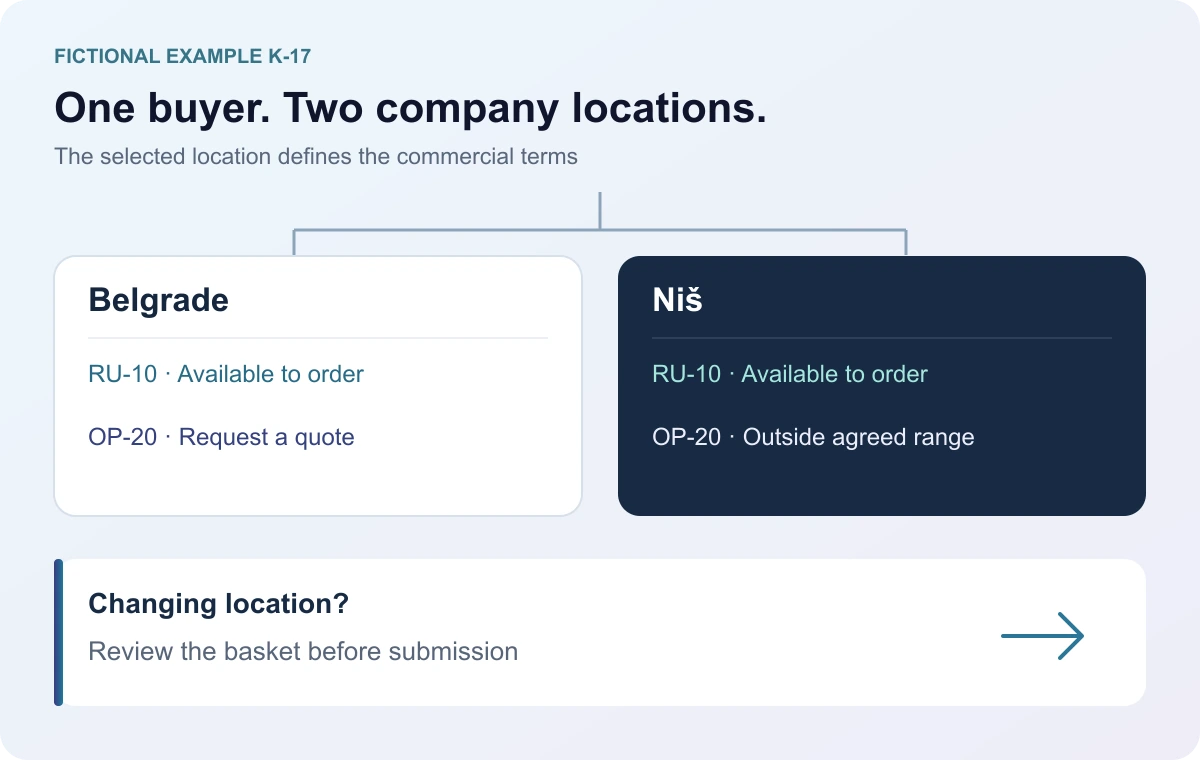
Imagine a work equipment supplier and a customer with locations in Belgrade and Niš. K-17 is fictional and does not describe actual price lists or a client project. Purchasing staff may work for both locations. Gloves RU-10 use the same negotiated price list, while special equipment OP-20 requires a quote for Belgrade and is outside the Niš location's agreed range.
Scroll the table sideways to see all columns.
| Rule | Belgrade | Niš |
|---|---|---|
| Gloves RU-10 | Available to order. | Available to order. |
| RU-10 price | Valid negotiated price list. | The same negotiated price list. |
| Equipment OP-20 | Request a quote. | Outside the agreed range. |
| Request destination | The Belgrade location. | The Niš location. |
Purchasing prepares RU-10 and an OP-20 quote request for Belgrade, then switches to Niš. In this example, the portal marks OP-20 as an item that cannot be submitted for the new location and retains it as a draft until the user decides what to do. The buyer can separate the Belgrade request and confirm the remaining Niš order. The change must not silently submit equipment for the wrong location or leave the previous location only in the final document.
Where should access to negotiated information be checked?
Server processing must check that the user may access the chosen location, product and action. The OWASP authorisation guidance recommends validating permissions on every request. Hiding a button or omitting a product from the interface does not provide that control.
The OWASP guide to object access covers checking access to other users' documents and identifiers. Apply the same permissions to direct URLs, downloaded price lists and requests from a window opened earlier. Decide what happens when access is revoked or a user moves to another group. An old window should not allow submission under terms the user is no longer entitled to use.
For documents, define who receives them and how they are downloaded. A confidential price list should not use a public link available to anyone who knows the address. Include caching in the technical specification: one business account's information must not appear to the next user of the same session or device.
Who maintains the rules, and what if a price list is missing?
Choose an authoritative source for each item of information. Prices may come from business software, while permission for a special range is maintained in the portal administration. Record who maintains each value and how changes are reconciled. Planning API integrations includes transfer, acknowledgement and what happens when the connected system is unavailable.
If a valid price list is missing, buyers need a clear next step. You can agree on a request for quote confirmation or temporarily prevent submission. Present a base price as valid only if sales has approved that outcome. Keep a record of approved changes in administration and explain the request's status to the buyer.
An order already submitted and accepted needs an agreed amendment process. A new price list should not automatically overwrite its earlier calculation. If the submission is still a quote request, decide who confirms the final terms and where the buyer receives the response.
What should you check before inviting buyers?
Prepare test accounts for different locations, one account without negotiated terms and an owner from sales. Record each expected outcome before testing. The following scenarios are proposed checks, without claiming they have been performed on a particular client portal.
- The buyer sees the same RU-10 price on the product page, in the basket and confirmation; the unit and location remain correct.
- Switching from Belgrade to Niš gives OP-20 an explained status. It cannot be submitted for Niš until the item is resolved.
- An account without a price list receives the agreed message and route to sales, without silently accepting an unapproved price.
- Direct attempts to open a restricted document or submit for another company location do not grant access.
- After a group change or price-list expiry, an open basket requires another check before the request is accepted.
- If a public store is also available, visitors without B2B permissions do not receive a business buyer's negotiated prices or restricted range.
Shopify's B2B setup testing guide also calls for checking prices through the product page, basket and checkout, with a separate public-customer check. Extend those checks to your portal's specific agreements and documents. Start with a limited group; our guide to moving from email orders explains parallel processing during a pilot.
What should you send us for a B2B portal estimate?
Prepare fictional terms for two buyer types, a few products and a location change with an existing basket. Add the source of prices, how exceptions are approved and the expected behaviour when information is missing. Actual contracts and login credentials are not needed for the initial discussion.
As part of B2B portal development, we work through these rules before building screens and connecting business software. Include them in your project estimate request so we can agree on the first release and the exceptions that need checking.