
Booking website development needs to account for requests arriving together. When two visitors request the last available slot, the system should confirm one booking, checking capacity as it saves the reservation. The other visitor receives an availability update and can choose again. A calendar viewed earlier cannot guarantee that the slot is still free.
The rules depend on capacity. A room may accommodate one group, while a course can have several places available at the same time. Before development, define what is being reserved, how long the service lasts and whether it needs a buffer. Those rules determine when two requests actually conflict.
Is the visitor making an enquiry or confirming a booking?
If a member of staff still needs to check the schedule, say that the booking enquiry has been received. Explain how the visitor will hear back and when to expect confirmation, based on how your business works. Successfully submitting a contact form does not by itself reserve capacity.
For an immediate booking, the system needs authority to reserve the resource. Agree which calendar is authoritative and who can change it. A telephone booking entered by staff should pass the same checks as a website request. If a separate scheduling tool receives updates with a delay, define how the systems connect and how discrepancies are handled.
Our clinic website guide covers the information visitors need before contacting you. Reserving appointment capacity needs its own specification, even when the form on the website is short.
When does a slot count as occupied?
Separate availability from the status of a request. A confirmed booking takes capacity, while a pending enquiry does so only if that is the agreed rule. A temporary hold can help when the visitor needs to finish another step, such as payment. It needs an expiry time and a rule that releases capacity when that time passes.
Scroll the table sideways to see all columns.
| Status | Message to the visitor | Capacity rule |
|---|---|---|
| Available | You can choose the slot; availability is checked at confirmation. | Include staff entries, service duration and preparation buffers. |
| Enquiry pending | Your request has been received and awaits a staff response. | Specify whether an enquiry temporarily takes a place. |
| Temporarily held | Your choice is held until the stated time. | Release the place on expiry if the confirmation condition is unmet. |
| Confirmed | The booking has a reference, time, location and service. | Keep the authoritative record and respect the occupied capacity. |
| Cancelled | Your cancellation has been accepted. | Restore availability according to the agreed rules. |
Choose the hold duration around the task the visitor needs to finish. An unnecessarily long hold can block the schedule with abandoned requests. For rescheduling, decide when to release the old slot so the visitor does not lose an existing booking before the new choice is accepted.
How do you stop two requests confirming the same place?
Ask for capacity checking and reservation to be linked within server processing. Two separate checks can both find a free place if another request arrives between reading availability and saving the booking. Disabling a browser button helps the visitor, but the capacity rule also needs to apply when a request arrives through another route.
The implementation depends on the data model. PostgreSQL constraints can reject an invalid write. Its range documentation also demonstrates preventing overlapping reservations for the same room. A unique start time is insufficient when bookings of different durations can overlap.
The business acceptance criterion is testable: when one place remains, two simultaneous requests must not both receive confirmation. If a course has two available places, both requests can be accepted. The rule needs to reflect the actual service capacity.
A hypothetical example: one room and two visitors
Imagine room A booked by a group from 10:00 to 11:00. In this fictional example, the room then needs 15 minutes of preparation. Two test visitors see the same available slot and submit their requests almost simultaneously.
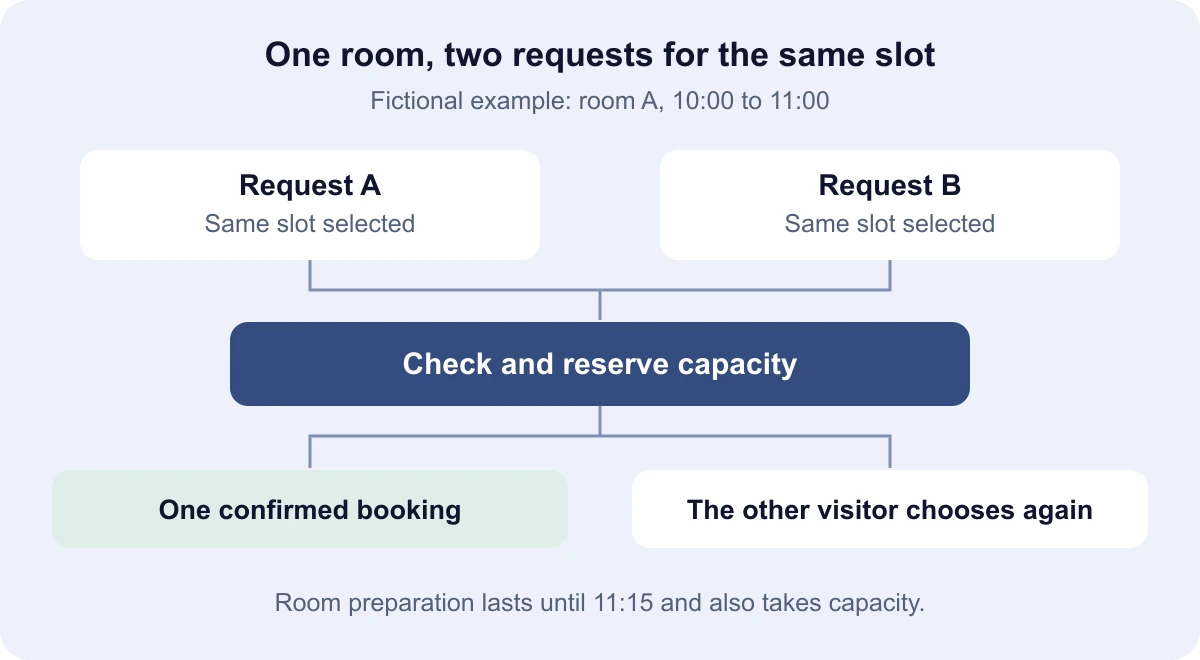
The administration view should show one confirmed booking. The other visitor should receive updated availability and another choice, retaining appropriate information already entered. Repeat the test in the opposite order, then while a member of staff enters a telephone booking.
A request starting at 10:30 also overlaps the occupied room. An 11:00 start does not fit this example either, because preparation lasts until 11:15. When another room or staff member is added, check that their separate capacity remains available.
What if the visitor double-clicks or submits again?
After a connection failure, the visitor may not know whether the first request was accepted. Processing the same intention again should find the existing booking and return its status instead of creating another reservation. The system needs a stable request identifier and a rule that distinguishes a retry from a genuinely new booking.
This is called idempotent processing. As a concrete example, Stripe's idempotent request documentation describes retrying an operation with the same key. The local booking record needs its own handling; passing a key to a payment provider does not by itself prevent duplicates in your calendar.
Test a double-click, a retry after a connection failure and refreshing the confirmation page. A repeated accepted request should retain the same booking reference. Deliberately creating another booking needs a new identifier and a new capacity check.
What if payment confirmation or a notification arrives late?
A saved booking and a sent email have separate outcomes. If a notification fails, let the visitor check the existing booking and let staff find the record and resend the message. An unsuccessful email should not create another calendar entry.
For payments, do not rely solely on the customer's return to a confirmation page. Stripe's payment fulfillment guidance explains server notifications, repeated calls and later confirmation for some payment methods.
Agree what happens in your workflow if payment succeeds after a hold expires and someone else has taken the place. Record a status that staff can review, with a process for arranging another slot or a refund under your terms. A late message must not automatically overwrite someone else's confirmed booking.
What should you test before launch and prepare for a quote?
Finish testing by inspecting the administration records. An on-screen message alone cannot show whether capacity was calculated correctly. Start by agreeing these cases:
- Two visitors request the last place: only one receives confirmation.
- The same accepted request is repeated: one booking remains with the same reference.
- A temporary hold expires: capacity returns according to the agreed rule.
- Staff enter a booking manually: the website and administration follow the same schedule.
- A notification or payment confirmation is delayed: the status can be checked without a duplicate record.
- A booking changes or is cancelled: capacity and the visitor's message reflect the new state.
For website development with bookings, prepare an anonymised weekly schedule, the resources and service durations, cancellation rules and a description of your existing calendar. Connecting another business system forms part of the API integration scope. Send those details with your estimate request so we can define the booking process and test cases before preparing a proposal.