
A website redesign makes sense when problems recur across important pages and stem from their shared layout, structure or editing process. Updating a few pages is a reasonable first option when you can define the problem and check that it has been fixed. Before requesting a new website, list what a visitor or an employee cannot do today.
A site's age can start the discussion, but its condition and the business's needs determine the work. An older-looking site may explain the offer well and receive enquiries. A contemporary design also needs to work in practice: finding a service, reading on a phone, sending a request and editing content.
How do you describe the problem before discussing a redesign?
Add a specific example to the request for a more modern website. Record the page address, device, task and point where you get stuck. “I cannot complete the form on my phone” gives the review a clearer starting point than a general impression that the site works poorly.
If enquiry numbers have changed, check where that information comes from. Does the form accept valid input and deliver the message to the team? Do visits reach the relevant service? Does analytics measure the correct domain and distinguish genuine requests from tests? Falling traffic and failed message delivery need different checks.
For a speed problem, record several representative pages. The Web Vitals documentation distinguishes lab measurements from real visitor data; results also depend on the device, connection and use. One PageSpeed result cannot determine the scope of a redesign. Our guide to slow websites on phones explains the order of technical checks.
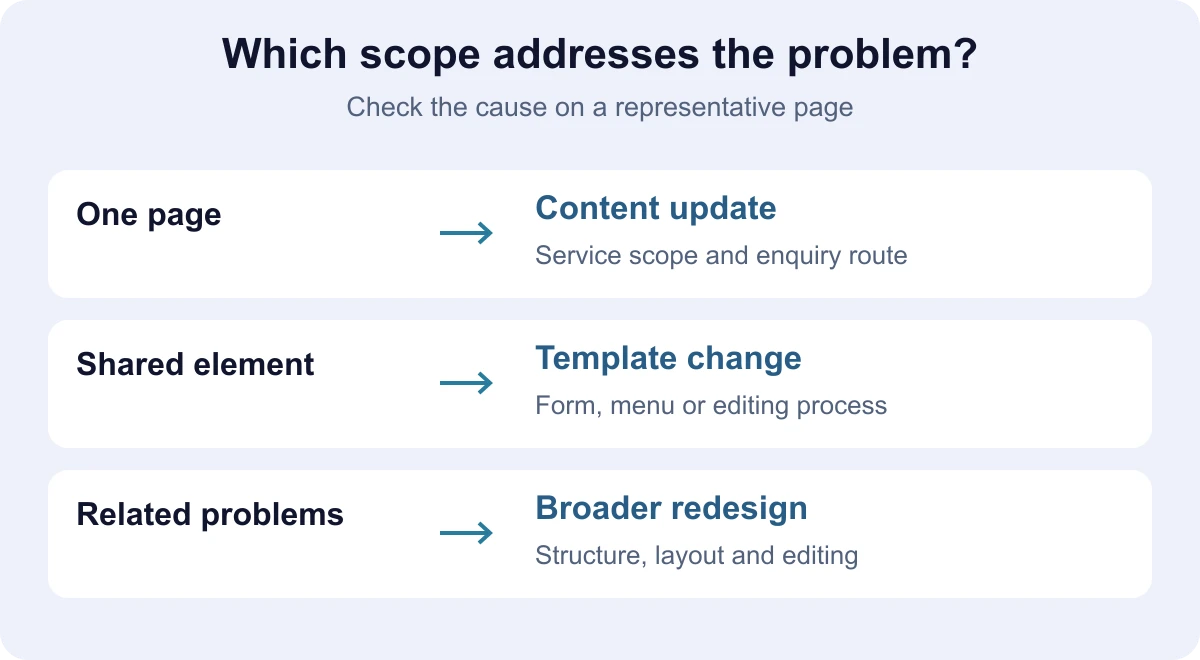
When should you update pages, change a template or redesign the site?
Scroll the table sideways to see all columns.
| Observed problem | What to investigate first | Possible scope |
|---|---|---|
| One service lacks enough information | Which questions remain unanswered and whether the current layout can accommodate the answers. | Update that page and the links leading to it. |
| The same form is difficult to use on several pages | The shared form, error messages and enquiry delivery. | Change the form component and check every place it is used. |
| Visitors cannot find an important service | Menu labels, grouping of services and the route to the page. | Update navigation and review the affected pages. |
| Most pages are difficult to use on a phone | The shared template, element sizes and menu behaviour. | Rework the template, or redesign more broadly if the existing foundation limits the solution. |
| Each information update requires repeated manual edits | Where the information is stored and how the editor changes it. | Revise the content model or CMS, with an agreed data migration scope. |
| The business's offer has changed substantially | Which structure and content still fit the business. | A broader project where the offer, navigation and editing process need related changes. |
A problem on several pages often comes from one shared component. Ask the developer to identify the cause and show what the existing foundation can support. A new CMS should follow requirements for editing, access and maintenance. If the platform is also undecided, read our WordPress and custom website comparison.
What does a trial update of one page involve?
Choose a representative page: important enough to the business and typical enough to reveal the current template's limits. Save its content and agree on a test task before making changes. If you change a form or menu shared by several pages, list those pages too.
This example is fictional. A business describes most services clearly, but gives its equipment maintenance contract one sentence. A customer cannot establish what the package covers or what to send for an estimate. A trial update adds the service scope, exclusions, an example request and a clear enquiry link.
Give someone unfamiliar with the content this task: “Find out whether the service covers your equipment and prepare the information needed for an enquiry.” Observe where they stop without explaining the route. Then check whether an editor can change the service scope and whether the updated page remains readable on a phone.
If the task works within the existing template, you have a basis for quoting a limited update. If the trial reveals repeated manual edits, difficult content maintenance or navigation that no longer fits the offer, request an estimate for those shared problems. The trial checks usability for that task; changes in enquiry numbers need later measurement against comparable visits.
How do you check whether the change worked?
Agree on an observable result and who accepts it before work starts. For the trial maintenance page, the checks might be:
- A visitor finds the service scope and exclusions from the menu or relevant entry page.
- They can read the content and access the form on a phone.
- The form explains required fields and errors, and a valid test enquiry reaches the agreed destination.
- An editor can change a detail without manually updating several copies.
- Useful existing addresses and links remain available.
Also check keyboard access, visible focus and field labels. The W3C preliminary accessibility checks help identify basic barriers. Passing them is an initial review; a comprehensive accessibility assessment requires a wider evaluation.
What should you compare in update and redesign proposals?
Both proposals should start from the same problems. For each one, request the pages and shared elements that will change, the content to be transferred, your team's responsibilities and acceptance criteria. Identify requirements left for later. This makes the differences in scope and price easier to assess.
For a broader project, ask how employees will make everyday edits. Assess a proposed system through a real operation, such as entering a service, changing a project reference or adding a translation. For recurring interventions, agree on maintenance scope and responsibilities, including checks after a change.
The work also includes preparing text, photos you have permission to use and a review of existing data. Agree who confirms their accuracy. To start an estimate, prepare the current site address, a few problems with examples, the intended result and the access you can provide. Share passwords through an agreed secure channel.
What should you preserve in either type of change?
List public addresses, useful text, documents and contact journeys. Review content that brings visits or helps sales before removing it. Save baseline data for important pages so you can compare their condition after release.
If the project changes URLs, Google's guidance on URL changes covers mapping old and new pages, redirects and monitoring after the move. A new design does not itself require new addresses. For an agreed broader project, continue with our website redesign SEO checks.
To discuss building or improving your website, send examples of what you want to fix and the task a visitor should complete. Request an update or redesign estimate with that information so we can propose the scope and what to check first.